
Book a room, in one tap.
A 10.1-inch PoE display that mounts outside any meeting space and shows live availability, the next booking, and a color-coded status visible from across the floor. Tap a badge or phone to check in, extend, or grab the room on the spot.
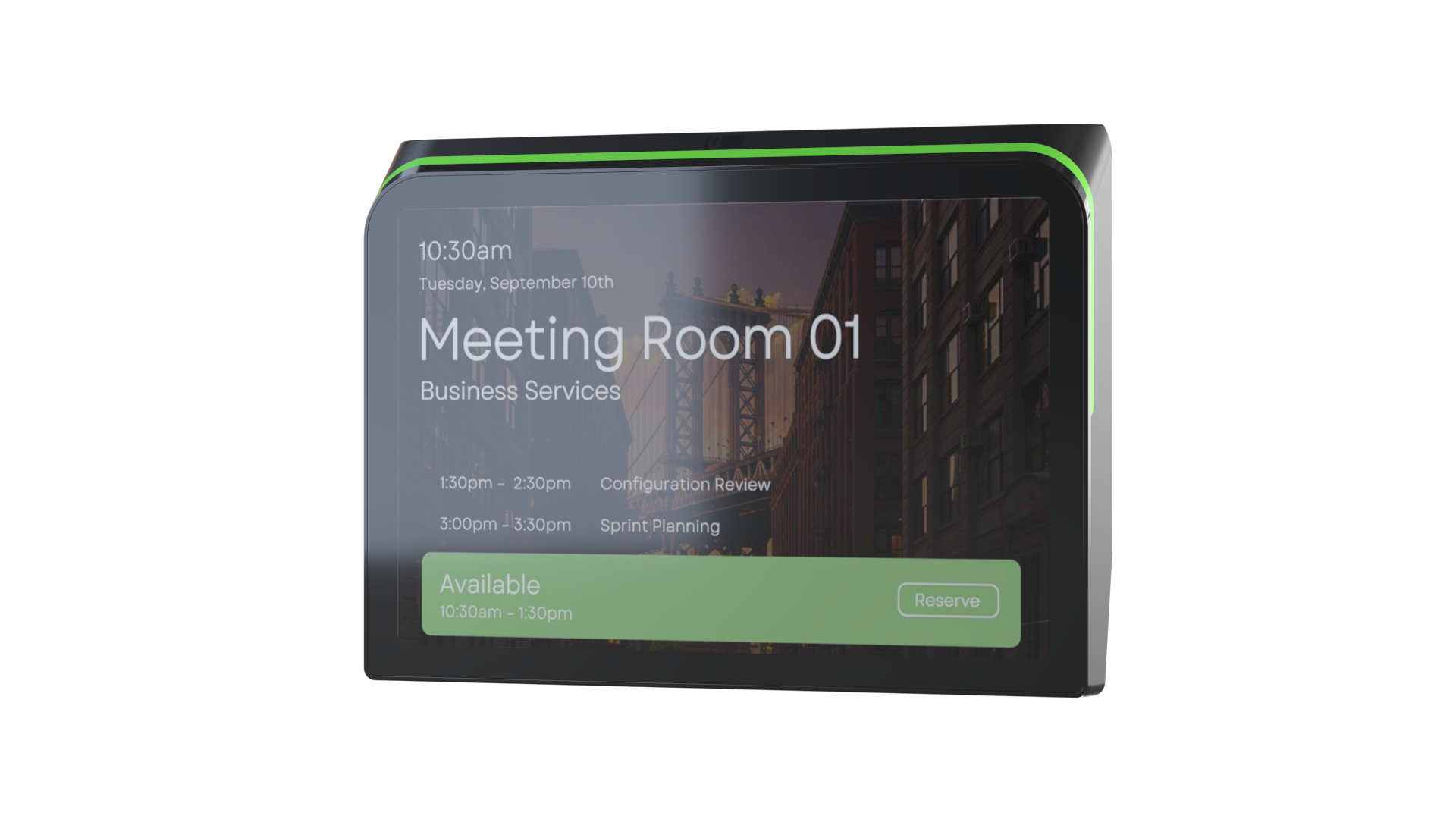
A Room Sign is a small digital display that lives outside a meeting space and shows whether the room is free, reserved, or in use. The Embrava Room Sign is a 10.1-inch PoE panel that pulls live availability from your room-booking platform, displays the next reservation and the time remaining, and lights up in a color anyone can read from down the hall.
Hybrid offices have a measurement problem. Booking software captures intent: who said they were going to use the room. It doesn't capture reality: who actually showed up, how long they stayed, whether the room sat empty for half its block. The Room Sign closes that gap. Every tap on the device is a ground-truth check-in event, so the data your facilities team works from reflects the building as it really runs, not as the calendar wishes it ran.
It's built for the way modern floors are laid out. Wall mount, glass-wall mount, and mullion mount cover the three things a hallway can be made of, so the same device fits the corner boardroom and the four-person huddle by the kitchen. PoE means one cable for power and data, which keeps the install simple and the cabling tidy. The room sign on the wall stays the same if you swap booking platforms underneath, so the hardware decision and the software decision stay separate.
Now with a bigger screen for any room in the office. Same tap, same color states, same calendar sync, sized for meeting rooms and conference spaces.
See the Desk Sign →Use an RFID badge or HID Mobile Credentials via Apple or Google Wallet. Browse, edit, and make upcoming reservations right at the door.
Color-coded status lights visible from across the floor. No more interruptions, checking apps, or knocking on doors.
Understand how rooms are actually used. Gather real utilization data to make better decisions about your real estate.
Any employee listed on a room reservation can check in to Room Sign to change the status from "Reserved" to "In-Use", or make an on-the-spot booking at an "Available" room.
Check-in data tells you what they're actually doing. Real-time check-ins create a richer, more reliable data set than booking software alone.
Calendar reservations capture intent. They miss no-shows, ghost meetings, early leaves, and on-the-spot grabs entirely.
Every tap is a ground-truth utilization signal. Multi-site dashboards show real occupancy by floor, neighborhood, and time of day.
The Embrava Room Sign plugs into the room-booking and workplace platforms you already run. Open API for new or custom integrations, no rip-and-replace, no middleware, no new credentials.
See the full partner ecosystem →Standard outside-the-room mounting. Sits flat against drywall, brick, or panel, perfect for hallway-facing conference rooms and huddle spaces.
Designed for glass partitions and conference-room doors. No drilling, the bracket adheres on both sides for a clean, low-profile look.
For the narrow vertical strips between glass panels. Ideal for modern offices where every room has glass walls but no wall to mount on.
A meeting room sign is a small display mounted outside a conference room or huddle space that shows whether the room is free, reserved, or in use. It pulls live availability from your room-booking platform and shows the next booking, the meeting subject, and the time remaining. A color-coded status light makes the state readable from across the floor so people don't have to walk up and check.
Yes. The Embrava Room Sign integrates with Microsoft Places, alongside other workplace platforms like Eptura, Robin, OfficeSpace, ServiceNow, and Envoy. The same device works across platforms, so the room sign on the wall stays the same if you switch booking software underneath.
Yes. Room availability comes from your calendar, so the Room Sign reads live bookings from Microsoft 365, Exchange, and Outlook through the Embrava platform's bi-directional sync. It also works through Microsoft Places and with Google Workspace, Zoom, Robin, Eptura, and ServiceNow, and the same device carries over if you change booking platforms.
Yes. Anyone listed on a reservation can check in with a tap, change the status from Reserved to In-Use, and extend or release the room from the touchscreen. If a room is Available, walk-ups can grab it on the spot for a stand-up or quick huddle without opening their laptop.
A ghost booking is a room that shows reserved on the calendar but sits empty. The Room Sign handles this two ways. It is the check-in surface, so a meeting only flips from Reserved to In-Use when someone taps a badge, scans a QR code, or touches the screen, which means a room nobody claims shows up as a no-show in your utilization data instead of hiding in the calendar. And when your booking platform auto-releases unclaimed rooms after a grace period, as Microsoft Places and others do, the Room Sign is where people check in to keep the room, with the green Available status readable from across the floor the moment it frees up so a walk-up can take it.
Five ways: tap an RFID badge, scan a QR code, use an HID Mobile credential via Apple or Google Wallet, hold an NFC-enabled phone to the reader, or touch the screen directly. No app to install and no login, the sign uses the credential employees already carry.
The Room Sign ships with three mounting options: a flush wall mount for standard drywall or panel, a glass-wall mount for conference-room doors and partitions with no drilling required, and a mullion mount for the narrow vertical frames between glass panels found in modern open offices.
The Room Sign runs on PoE for power and data over a single cable, so rolling out a floor is a Cat-6 drop per room and a 10-minute pairing. Wi-Fi 6 is supported where Ethernet isn't practical. Multi-site dashboards show every device's status, color scheme, and check-in data in real time, so a global rollout stays centrally managed.
Looking at alternatives? How Room Sign compares to Joan and the Logitech Tap Scheduler.
The fastest way to know if Room Sign fits your floors is to put a device in your hands. Sixty minutes at our Hudson Yards Experience Center, every product, the engineers, your stack pre-wired.